検索を足そうとしたら、コードに 'a がたくさん付いていた。あるいは、ファイルから読んだ文字列を、関数の外へ借りて返そうとして、コンパイルが止まった。そんなとき、手が止まった経験はありませんか。この回は、そのつまずきをいっしょに見ていきます。
第6回では、失敗を Result で返し、空行も整えてから、第4回の確認の型を回すところまで残しました。この回の土台は、第6回の完成形です。src/main.rs の sha256 は aff338dca8d9bb9eada24ac80fa9e2ffd938859cbaee630f4b9017eaded19d3d、空行を1行にした tests/cli.rs の sha256 は 2a4010a6c244c24647e6d9f847e6088ff0e42e5656592e0a65eefa8040f4054d です。Cargo.toml の [dependencies] は空のままです。
この土台に、言葉で探す search を足します。結果の持ち方には、所有して返す形と、借りて返す形があります。注釈なしで済むなら、その形を優先します。
この回で出てくる言葉
ライフタイムは、参照が有効でいられる範囲(スコープ)です。公式(Validating References with Lifetimes)は、すべての参照にはライフタイムがある、多くの場合は推論される(implicit and inferred)、と書いています。
ライフタイム注釈('a など)は、参照の寿命を変えるものではありません。複数の参照の寿命の関係を、型に書く印です。公式は、"Lifetime annotations don’t change how long any of the references live. Rather, they describe the relationships of the lifetimes of multiple references to each other without affecting the lifetimes." と書いています。必要になるときだけ書きます。すべての関数に付けるものではありません。
ダングリング参照は、すでに片づけられた値を、参照が指してしまう状態です。Rustのコンパイラは、そういう参照を作らせません。公式は同じ箇所の Dangling References と、References and Borrowing です。第3回でも、この話の始めのほうに触れてあります。
どれも、この回で実際に動かしながら確かめていきます。
この回では、Cursor の画面での実行は検証していません。AIの返事は、日や設定で変わるので、「こう返ってきました」とは載せません。代わりに、どんな返事が来ても確かめられるように、見るところとプロンプトを載せます。この回で比べるコード(所有して返す形と、借りて返す形、関数の中の値を借りて返そうとする例、入力が2つで注釈が無い missing-lifetime.rs(E0106)のコード)も、AIの返事ではなく、比べるために私が用意したものです。
この記事でわかること
- ライフタイムは、参照がいつまで有効かの話であること
- 注釈は寿命を変えないこと。関係を書く印であること
- 検索結果を、所有して返す形と、借りて返す形で比べること
- 注釈なしで済むなら、その形を優先すること
- 直ったあと、第4回の確認の型を、同じディレクトリで回すこと
結論:注釈なしで済むなら、所有して返す
この回のゴールは、次の4つです。
-
'aを、寿命を変える魔法だと思わず、関係を書く印として見られる - 関数の中だけで生きる値を、借りて外へ返そうとすると、コンパイラが止めることを、小さな例で見られる
- techo-cli に
searchを足し、検索結果は所有して返す形(Vec<String>)で残せる - 失敗のテストを足したあと、
cargo check、cargo test、cargo clippy --all-targets、cargo fmt --checkを、同じディレクトリで、この順に回せる
コマンドは、自分がターミナルで実行します。エラーメッセージに、自分のホームディレクトリの実パスや、個人情報を出さないようにします。
公式(Validating References with Lifetimes)によると、ほとんどの場合、ライフタイムは推論されます。注釈が要るのは、参照の寿命の関係が、いくつか考えうるときです。この回の完成形の search は、結果を String として持つので、関数のシグネチャに 'a を書きません。
土台:第6回の完成形から始める
土台のファイルと sha256 は、次のとおりです。第6回の完成形と同じバイトです。
-
src/main.rs:aff338dca8d9bb9eada24ac80fa9e2ffd938859cbaee630f4b9017eaded19d3d -
tests/cli.rs:2a4010a6c244c24647e6d9f847e6088ff0e42e5656592e0a65eefa8040f4054d -
Cargo.toml:6e420e79e45c2a655ab05e73a093496c97b1e7afbaa5d51da2de70051780ca16(edition = "2024"、[dependencies]は空)
確認日の実機(2026-11-28、Asia/Tokyo)は、Debian GNU/Linux 13 (trixie)、DEBIAN_VERSION_FULL=13.8、x86_64 です。使った版は、次のとおりです。作業の前に、自分の環境でも rustc --version と cargo --version を見ます。版は環境で変わります。
- 1
- 2
- 3
kaito@demo:~$ rustc --version; cargo --version
rustc 1.100.0 (0ef1bc386 2026-11-09)
cargo 1.100.0 (3acc79c0c 2026-11-05)- 1
- 2
- 3
kaito@demo:~$ cargo clippy --version; cargo fmt --version
clippy 0.1.100 (0ef1bc3860 2026-11-09)
rustfmt 1.11.0-stable (0ef1bc3860 2026-11-09)- 1
- 2
- 3
- 4
kaito@demo:~$ rustup --version
rustup 1.29.3 (edbc831ce 2026-11-02)
info: This is the version for the rustup toolchain manager, not the rustc compiler.
info: the currently active `rustc` version is `rustc 1.100.0 (0ef1bc386 2026-11-09)`
同じ確認日に、使い捨て環境の rustc 1.100.1 (20ddd0171 2026-11-25) でも、ログを正規化したうえで同じ結果でした。確認日の時点では、1.100.1 より新しい安定版は無く、前回(第6回)の取得以降に、新しいセキュリティ告知もありませんでした(公式ページの取得は、同日 15:35 頃、Asia/Tokyo)。
土台の sha256 と、Cargo.toml は、次のとおりでした。[dependencies] は空です。
- 1
- 2
- 3
- 4
- 5
kaito@demo:~/techo-cli$ sha256sum Cargo.toml src/main.rs tests/cli.rs
6e420e79e45c2a655ab05e73a093496c97b1e7afbaa5d51da2de70051780ca16  Cargo.toml
aff338dca8d9bb9eada24ac80fa9e2ffd938859cbaee630f4b9017eaded19d3d  src/main.rs
2a4010a6c244c24647e6d9f847e6088ff0e42e5656592e0a65eefa8040f4054d  tests/cli.rs
exit=0- 1
- 2
- 3
- 4
- 5
- 6
- 7
- 8
kaito@demo:~/techo-cli$ cat Cargo.toml
[package]
name = "techo-cli"
version = "0.1.0"
edition = "2024"

[dependencies]
exit=0
土台の cargo test は、5 passed、終了コード 0 でした。同じディレクトリで、cargo check、cargo clippy --all-targets、cargo fmt --check も、終了コード 0 でした。cargo metadata では、packages は 1、custom-build は 0、proc-macro は 0 でした。Cargo.lock は 1 パッケージです。
- 1
- 2
- 3
- 4
- 5
- 6
- 7
- 8
- 9
- 10
- 11
- 12
- 13
- 14
- 15
- 16
- 17
- 18
- 19
- 20
- 21
kaito@demo:~/techo-cli$ cargo test; echo "exit=$?"
   Compiling techo-cli v0.1.0 (~/techo-cli)
    Finished `test` profile [unoptimized + debuginfo] target(s) in 0.20s
     Running unittests src/main.rs (target/debug/build/techo-cli/0b65a0efcc6e9ca7/out/techo_cli-0b65a0efcc6e9ca7)

running 0 tests

test result: ok. 0 passed; 0 failed; 0 ignored; 0 measured; 0 filtered out; finished in 0.00s

     Running tests/cli.rs (target/debug/build/techo-cli/2399541e0af3f046/out/cli-2399541e0af3f046)

running 5 tests
test add_when_data_file_is_a_directory_exits_one ... ok
test list_when_data_file_is_a_directory_exits_one ... ok
test add_without_args_prints_usage_and_exits_one ... ok
test list_when_file_is_missing_prints_empty_message ... ok
test add_then_list_shows_the_note_and_total ... ok

test result: ok. 5 passed; 0 failed; 0 ignored; 0 measured; 0 filtered out; finished in 0.00s

exit=0- 1
- 2
- 3
- 4
kaito@demo:~/techo-cli$ cargo check; echo "exit=$?"
    Checking techo-cli v0.1.0 (~/techo-cli)
    Finished `dev` profile [unoptimized + debuginfo] target(s) in 0.09s
exit=0- 1
- 2
- 3
- 4
kaito@demo:~/techo-cli$ cargo clippy --all-targets; echo "exit=$?"
    Checking techo-cli v0.1.0 (~/techo-cli)
    Finished `dev` profile [unoptimized + debuginfo] target(s) in 0.07s
exit=0- 1
- 2
kaito@demo:~/techo-cli$ cargo fmt --check; echo "exit=$?"
exit=0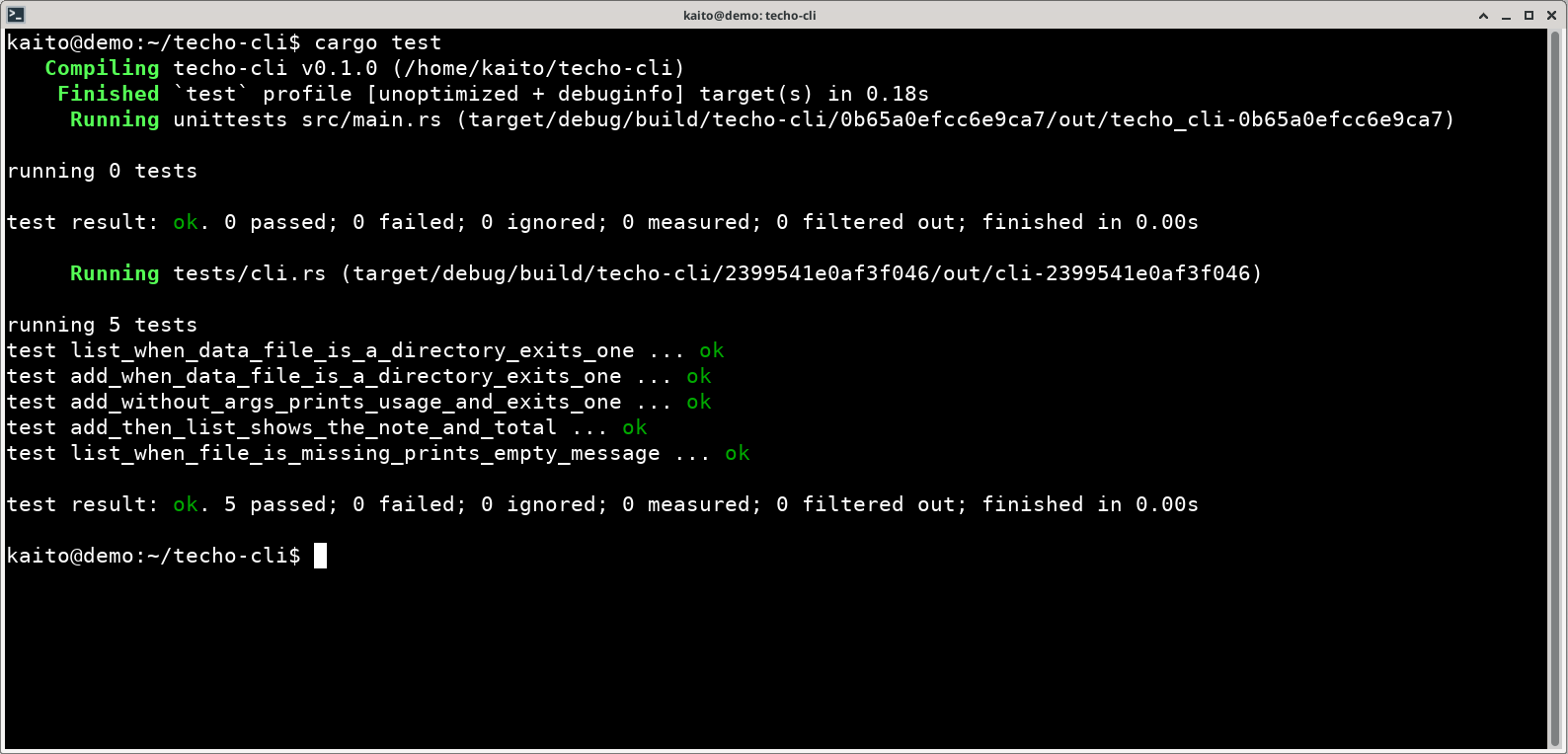
キャプション:土台(第6回の完成形)の cargo test。5 passed。画面はログとは別の回で、所要時間は 0.18 秒(ログは 0.20 秒)、テストの表示順も違う。画面の /home/kaito と、プロンプトの kaito@demo は、検証用の仮のユーザーです
土台の動きは、第6回の完成形のままです。ファイルの読み書きは io::Result を返し、ファイルが無いときの list は まだメモがありません で終了コード 0、引数の無い add は使い方を出して終了コード 1、ディレクトリや権限が無いときはエラー文を出して終了コード 1 です。この回では、その土台に search を足します。この回の権限の確認は、一般ユーザー(検証用の仮のユーザー kaito、uid 1000。root ではない)で行っています。
ライフタイムは、参照がいつまで有効か
参照は、指している値が残っているあいだだけ使えます。値が片づけられたあとに参照を使うことは、Rustではコンパイルの時点で拒まれます。第3回で見た、「関数の中で読んだ文字列を、借りたまま外へ返すことはできない」も、同じ向きです。
ほとんどの場合、コンパイラがライフタイムを推論します。'a を、すべての関数の先頭に書く必要はありません。注釈を付けるのは、入力と出力の参照の関係が、型だけ見ると複数ありうるときです。公式は、コンパイラが考える特定のパターンを lifetime elision rules(省略の規則) と呼んでいます。プログラマが従う規則ではなく、当てはまるときは注釈を書かなくてよい、という話です。公式は、この規則は完全な推論ではない(the elision rules don’t provide full inference)、とも書いています。
注釈は、参照を長生きさせる手段ではありません。公式の言い回しでは、寿命は変わらず、関係を書く、です。
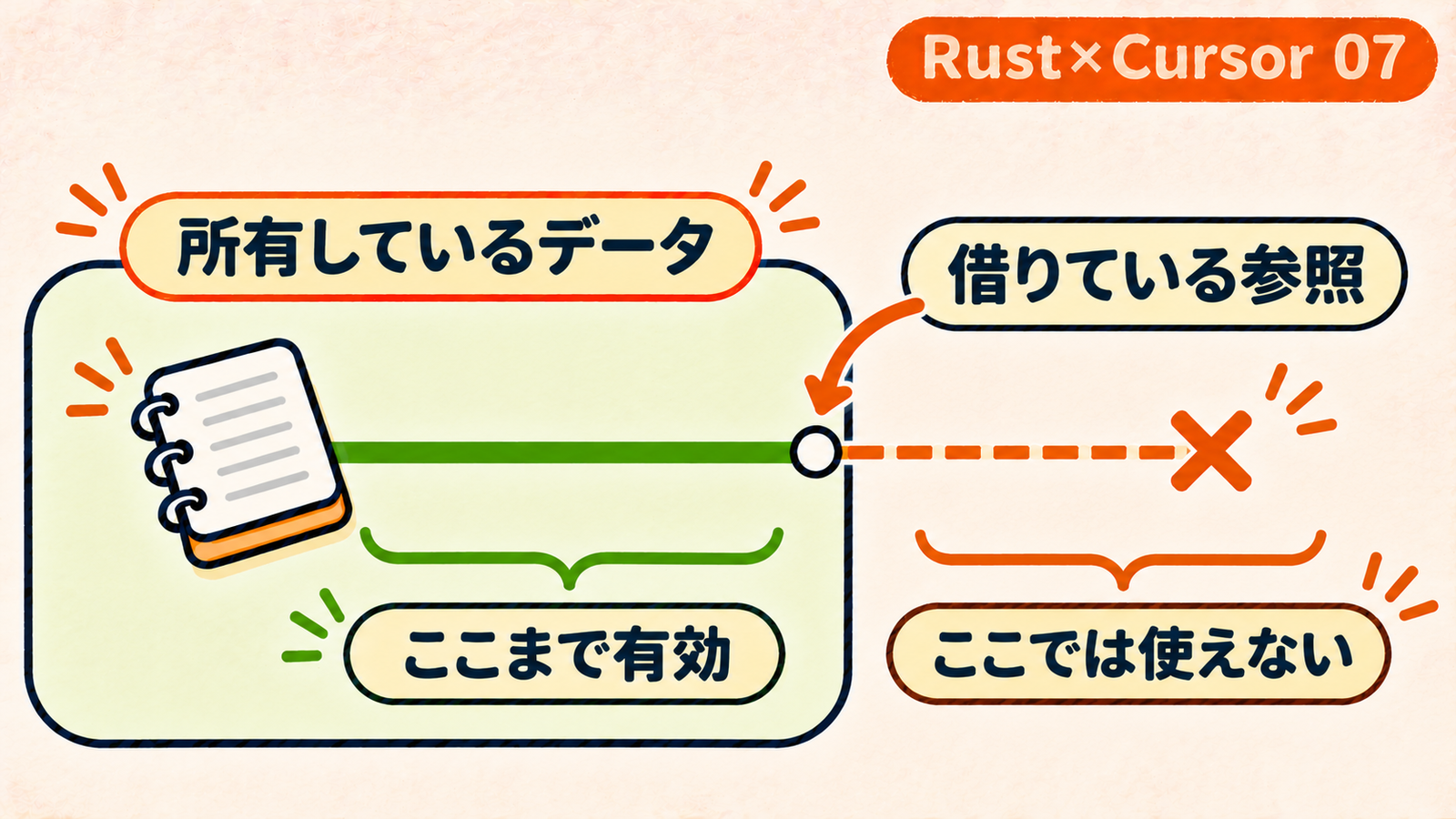
キャプション:所有しているデータが残っているあいだだけ、借りている参照は有効。データが終わった先では、その参照は使えない
薄い依頼と、確認つきの依頼
「ライフタイムを直して」だけ送ると、必要のないところまで 'a が付いたり、所有して返せば済むところを、借りて返す形に書き換えられたりすることがあります(この回ではAIの返事を検証していません)。そうなっても困らないように、見る範囲と、確かめ方を先に書きます。
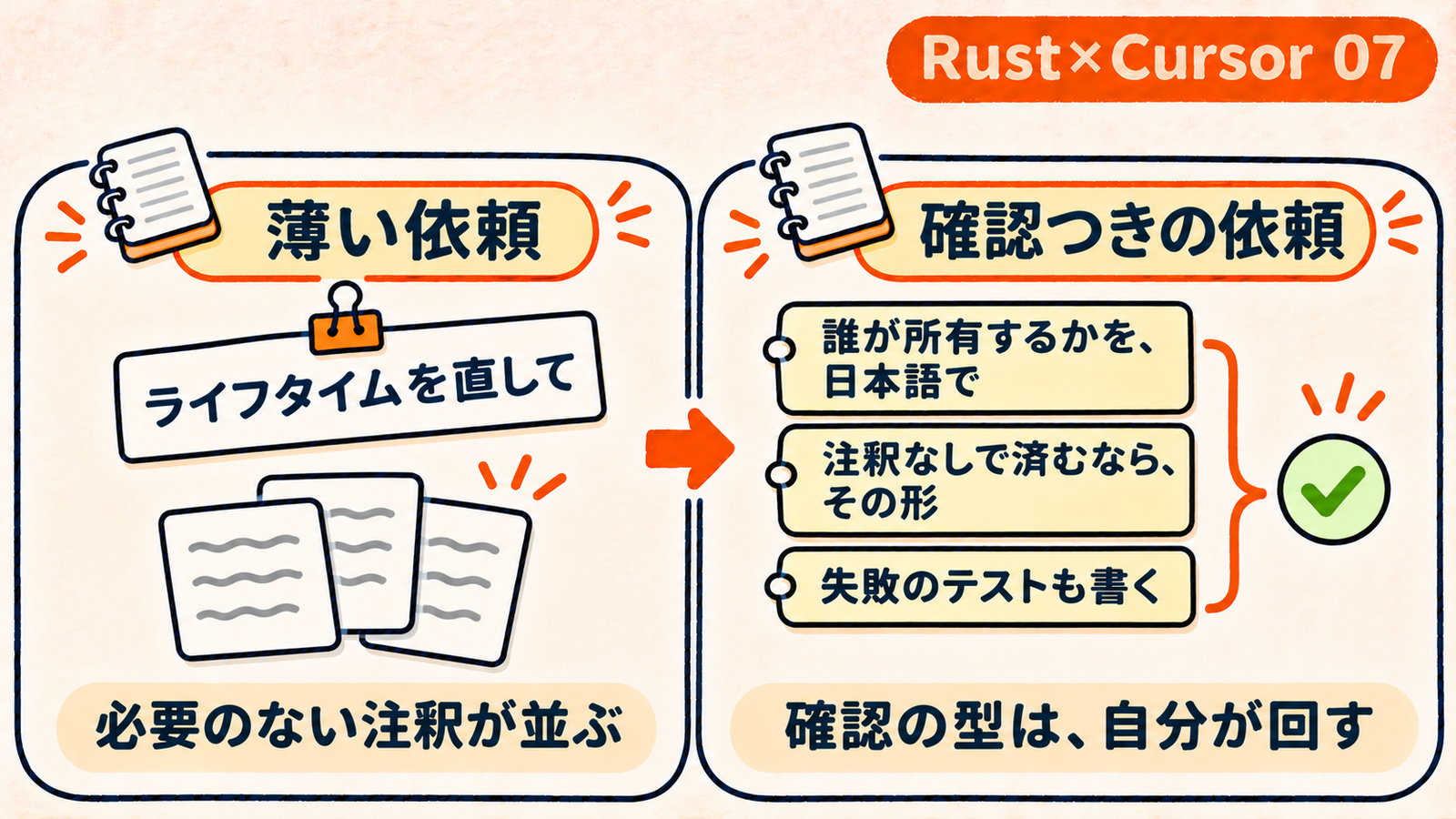
キャプション:薄い依頼と、確認つきの依頼。左は「ライフタイムを直して」だけで、必要のない注釈が並ぶことがある。右は、誰が所有するかを日本語で、注釈なしで済むならその形、失敗のテストも書く。確認の型は、自分が回す
頼むときは、次を先に書きます。
- 誰がデータを所有し、参照はどこまで生きる必要があるか。コードを書く前に、日本語で説明してもらう
- 注釈なしで済むなら、その形を優先する
-
searchの失敗(引数が無い、ファイルが無い、該当が無い、中身が読めない)もテストに残す - 依存は足さない。確認の型は、自分が回す
所有して返す/借りて返す
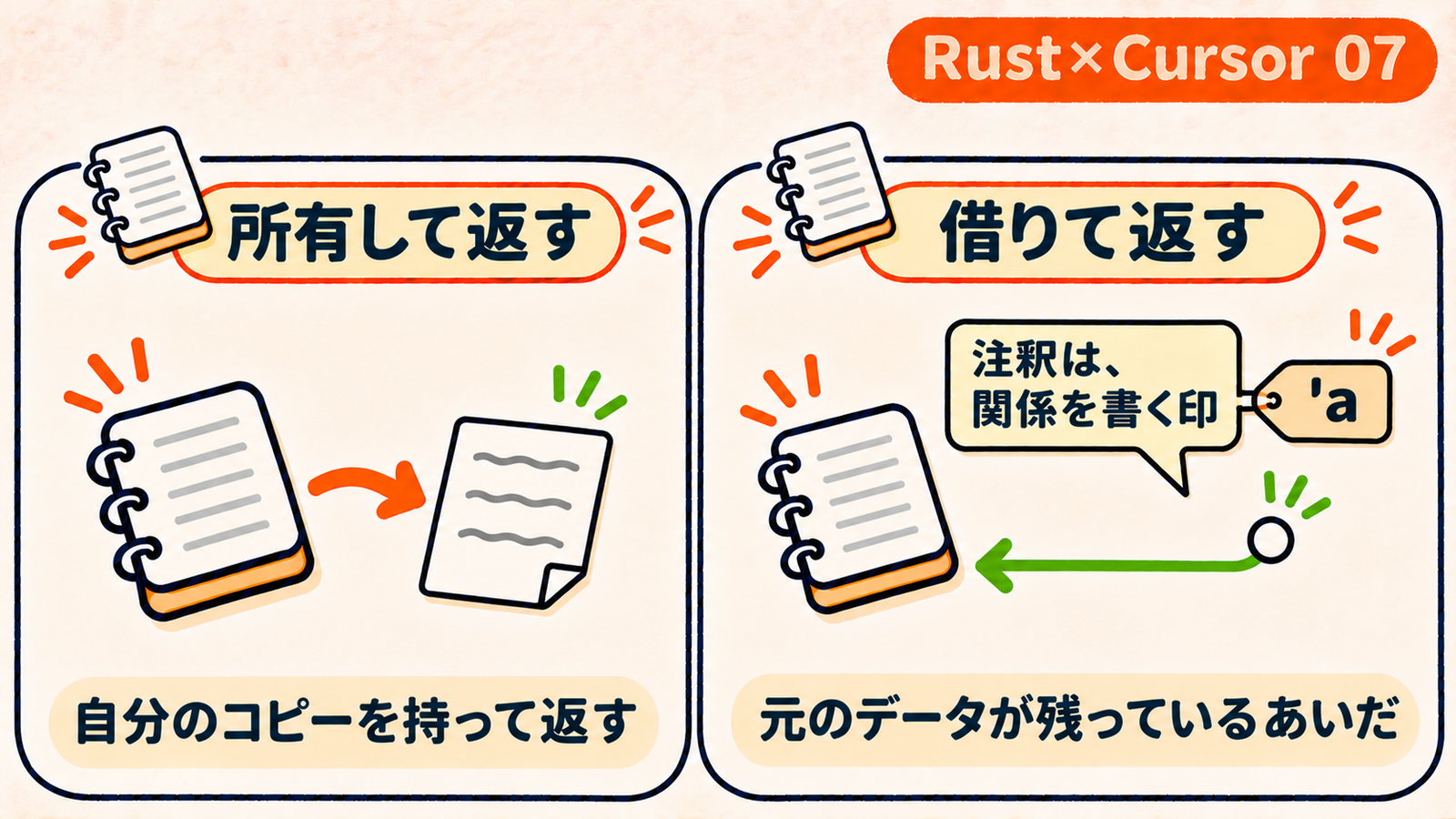
キャプション:所有して返す形は、自分のコピーを持って返す。借りて返す形は、元のデータが残っているあいだだけ使える。注釈は、寿命を変えるものではなく、関係を書く印
所有して返す形は、検索で残したい行を、新しい String として持ちます。元のバッファが関数の終わりで片づけられても、結果は残ります。この回の完成形は、この形です。土台の read_notes が、すでに行を Vec<String> として持っているので、その続きで足せます。
借りて返す形は、元の文字列の一部を &str として返します。コピーは増えにくい一方、元のデータが、参照を使うあいだ残っている必要があります。関数の中でだけ生きる String を借りて返そうとすると、コンパイルが通りません。
借りて返すときに、入力の参照が2つあると、返り値の &str がどちらを借りているのか、型だけ見ると決まりません。公式の省略の規則では、入力の参照が1つのときは、出力にもその寿命が割り当てられます。入力が2つあるこの形では、関係を注釈で書きます。
関数の中の値を、借りて返そうとする例
ダミーの2行を、関数の中の String に置き、一致した行を &str のまま返そうとする例です。ファイルは読みません。確認日の実機では、error[E0515](cannot return value referencing local variable content) で止まり、終了コードは 1 でした。
- 1
- 2
- 3
- 4
- 5
- 6
- 7
- 8
- 9
- 10
- 11
- 12
- 13
- 14
fn matching_lines(keyword: &str) -> Vec<&str> {
    let content = String::from("りんごを買う\nみかんを買う");
    content
        .lines()
        .filter(|line| line.contains(keyword))
        .collect()
}

fn main() {
    let found = matching_lines("りんご");
    for line in found {
        println!("{line}");
    }
}コマンドは、rustc --edition 2024 --crate-name return_local return-local.rs です。--crate-name は、クレート名を決める指定です。ファイル名に . が続く形(たとえば return-local.rs.to-verify のような名前)だと、クレート名として使えない文字が入って止まることがあるので、この回の確認では付けています。
追加の確認では、--crate-name なしでも測りました。rustc --edition 2024 return-local.rs は、同じ error[E0515](cannot return value referencing local variable content)で、終了コード 1 でした。return-local.rs.to-verify の名前のままだと、error: invalid character '.' in crate name(return_local.rs)で止まり、E0515 までは進みませんでした。どちらも終了コード 1 です。
- 1
- 2
- 3
- 4
- 5
- 6
- 7
- 8
- 9
- 10
- 11
- 12
- 13
- 14
- 15
- 16
- 17
- 18
- 19
- 20
kaito@demo:~/lifetime-examples$ rustc --edition 2024 --crate-name return_local return-local.rs
--- stdout ---
--- stderr ---
error[E0515]: cannot return value referencing local variable `content`
 --> return-local.rs:3:5
  |
3 |       content
  |       ^------
  |       |
  |  _____`content` is borrowed here
  | |
4 | |         .lines()
5 | |         .filter(|line| line.contains(keyword))
6 | |         .collect()
  | |__________________^ returns a value referencing data owned by the current function

error: aborting due to 1 previous error

For more information about this error, try `rustc --explain E0515`.
exit=1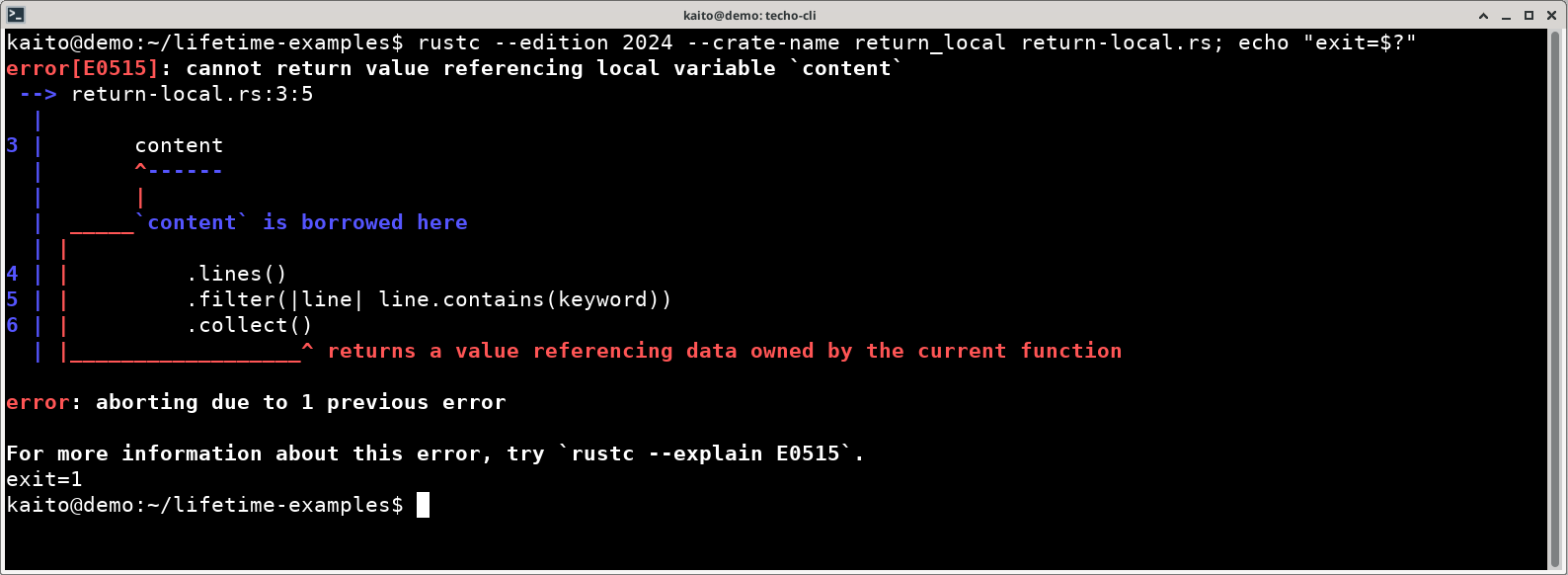
キャプション:return-local.rs を rustc したところ。error[E0515] で止まり、終了コード 1。画面はログとは別の回で、コマンドのあとに echo "exit=$?" を付けて撮っている。画面のプロンプトの kaito@demo は、検証用の仮のユーザーです
追加の確認では、--crate-name なしを、次のように回しました。
- 1
- 2
- 3
- 4
- 5
- 6
- 7
- 8
- 9
- 10
- 11
- 12
- 13
- 14
- 15
- 16
- 17
- 18
- 19
- 20
- 21
- 22
- 23
- 24
- 25
- 26
- 27
kaito@demo:~/lifetime-examples-07b$ rustc --edition 2024 return-local.rs; echo "exit=$?"
error[E0515]: cannot return value referencing local variable `content`
 --> return-local.rs:3:5
  |
3 |       content
  |       ^------
  |       |
  |  _____`content` is borrowed here
  | |
4 | |         .lines()
5 | |         .filter(|line| line.contains(keyword))
6 | |         .collect()
  | |__________________^ returns a value referencing data owned by the current function

error: aborting due to 1 previous error

For more information about this error, try `rustc --explain E0515`.
exit=1
kaito@demo:~/lifetime-examples-07b$ rustc --edition 2024 return-local.rs.to-verify; echo "exit=$?"
error: invalid character '.' in crate name: `return_local.rs`
  |
  = note: crate names may only contain alphanumeric characters or underscores
  = help: you might have meant to use `--crate-name=return_local_rs`

error: aborting due to 1 previous error

exit=1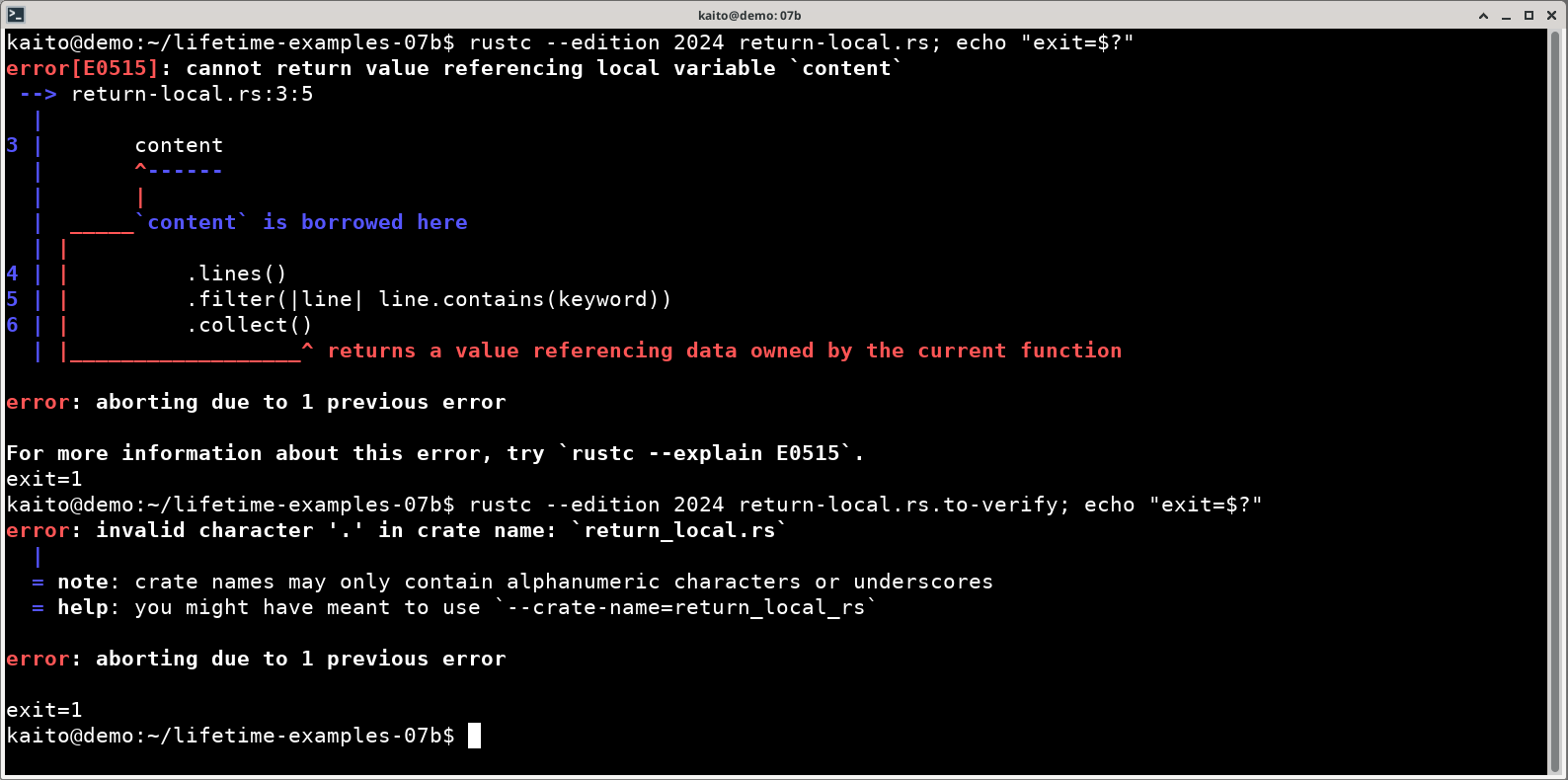
キャプション:--crate-name なしの rustc。return-local.rs は error[E0515]、return-local.rs.to-verify の名前のままだと invalid character '.' in crate name で止まる。画面の /home/kaito と、プロンプトの kaito@demo は、検証用の仮のユーザーです。画面の lifetime-examples-07b は、検証で使った作業ディレクトリの名前です。return-local.rs.to-verify は、検証で使ったファイルの名前です
公式の Book(Dangling References)の fn dangle() -> &String の例は、error[E0106]: missing lifetime specifier を出します。dangle は入力の参照が 0 個の関数です。この回の return-local.rs は、入力の参照が 1 つ(keyword: &str)ある関数で、実機のエラーは E0515 でした(署名は通り、本体で止まる)。読者が公式と見比べるなら、エラーの番号が違う、と覚えておくとよいです。省略の規則の第 2 のとおりに読めば、入力の参照が 1 つなので、返り値にその寿命が割り当てられるため、と説明できますが、コンパイラがそう言っているわけではありません。
入力が2つあるとき、注釈が無い例
元の文字列と、探す言葉の、両方を借りる形です。返り値の &str が、どちらを借りているかを型に書いていません。確認日の実機では、error[E0106]: missing lifetime specifier で止まり、終了コードは 1 でした。コンパイラの help は、両方の引数に同じ印を付ける案(fn matching_lines<'a>(content: &'a str, keyword: &'a str) -> Vec<&'a str>)を出します。実機でも、この案が出ました。比較例では、返すスライスが指すのは content の中身なので、content 側にだけ 'a を付けます。
- 1
- 2
- 3
- 4
- 5
- 6
- 7
- 8
- 9
- 10
- 11
- 12
- 13
- 14
fn matching_lines(content: &str, keyword: &str) -> Vec<&str> {
    content
        .lines()
        .filter(|line| line.contains(keyword))
        .collect()
}

fn main() {
    let content = String::from("りんごを買う\nみかんを買う");
    let found = matching_lines(&content, "りんご");
    for line in found {
        println!("{line}");
    }
}- 1
- 2
- 3
- 4
- 5
- 6
- 7
- 8
- 9
- 10
- 11
- 12
- 13
- 14
- 15
- 16
- 17
- 18
- 19
kaito@demo:~/lifetime-examples$ rustc --edition 2024 --crate-name missing_lifetime missing-lifetime.rs
--- stdout ---
--- stderr ---
error[E0106]: missing lifetime specifier
 --> missing-lifetime.rs:1:56
  |
1 | fn matching_lines(content: &str, keyword: &str) -> Vec<&str> {
  |                            ----           ----         ^ expected named lifetime parameter
  |
  = help: this function's return type contains a borrowed value, but the signature does not say whether it is borrowed from `content` or `keyword`
help: consider introducing a named lifetime parameter
  |
1 | fn matching_lines<'a>(content: &'a str, keyword: &'a str) -> Vec<&'a str> {
  |                  ++++           ++                ++              ++

error: aborting due to 1 previous error

For more information about this error, try `rustc --explain E0106`.
exit=1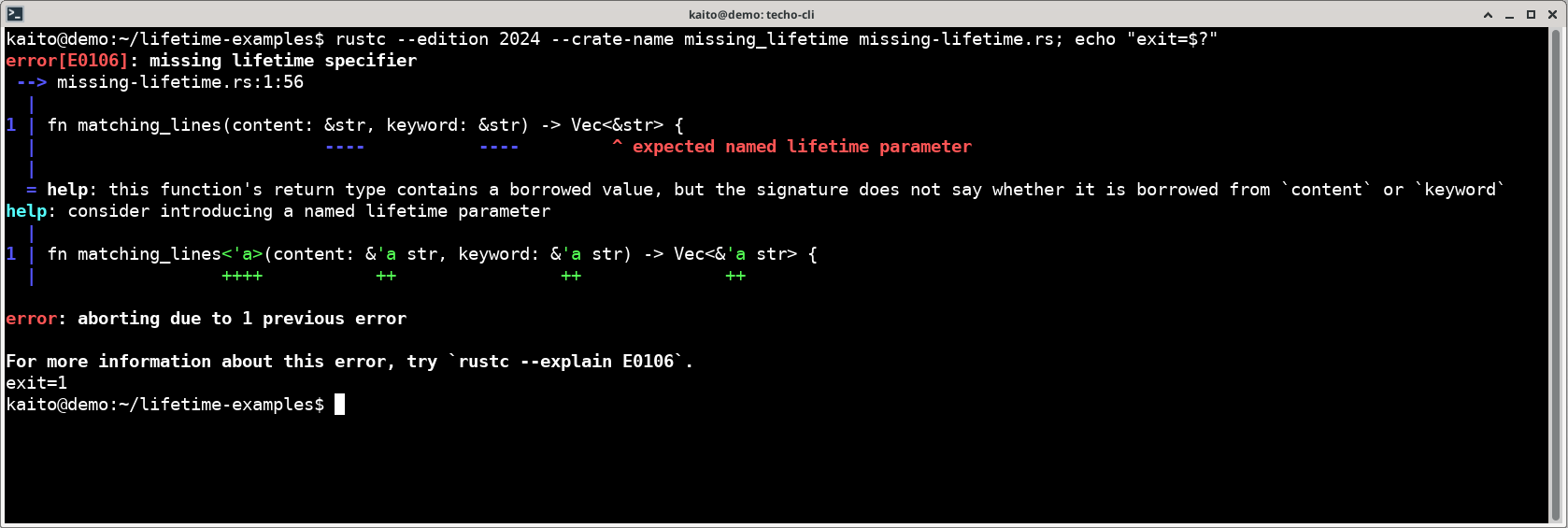
キャプション:missing-lifetime.rs を rustc したところ。error[E0106] で止まり、help は両方の引数に 'a を付ける案。終了コード 1。画面はログとは別の回で、コマンドのあとに echo "exit=$?" を付けて撮っている。画面のプロンプトの kaito@demo は、検証用の仮のユーザーです
関係を注釈で書いた例
content の寿命と、返り値の寿命を、同じ 'a で結びます。keyword は、中を見るあいだだけ借りれば足りるので、同じ印は付けません。確認日の実機では、この例はコンパイルが通り、実行すると りんごを買う と出て、終了コードは 0 でした。
- 1
- 2
- 3
- 4
- 5
- 6
- 7
- 8
- 9
- 10
- 11
- 12
- 13
- 14
fn matching_lines<'a>(content: &'a str, keyword: &str) -> Vec<&'a str> {
    content
        .lines()
        .filter(|line| line.contains(keyword))
        .collect()
}

fn main() {
    let content = String::from("りんごを買う\nみかんを買う");
    let found = matching_lines(&content, "りんご");
    for line in found {
        println!("{line}");
    }
}- 1
- 2
- 3
- 4
kaito@demo:~/lifetime-examples$ rustc --edition 2024 --crate-name annotated annotated.rs
--- stdout ---
--- stderr ---
exit=0- 1
- 2
- 3
- 4
- 5
kaito@demo:~/lifetime-examples$ ./annotated
--- stdout ---
りんごを買う
--- stderr ---
exit=0
キャプション:annotated.rs を rustc して実行したところ。コンパイルは通り、実行すると「りんごを買う」。終了コード 0。画面はログとは別の回で、コマンドのあとに echo "exit=$?" を付けて撮っている。画面のプロンプトの kaito@demo は、検証用の仮のユーザーです
入力の参照が 1 つだけの関数は、省略の規則に当てはまるので、注釈なしで済みます。確認日の実機では、記事のコードとは別に、検証用の小さなファイルで確かめました。fn first_line(content: &str) -> &str は、注釈なしでコンパイルが通り、実行すると りんごを買う、終了コードは 0 でした。
- 1
- 2
- 3
- 4
- 5
- 6
- 7
- 8
fn first_line(content: &str) -> &str {
    content.lines().next().unwrap_or("")
}

fn main() {
    let content = String::from("りんごを買う\nみかんを買う");
    println!("{}", first_line(&content));
}- 1
- 2
- 3
- 4
kaito@demo:~/lifetime-examples$ rustc --edition 2024 --crate-name one_input one-input.rs
--- stdout ---
--- stderr ---
exit=0- 1
- 2
- 3
- 4
- 5
kaito@demo:~/lifetime-examples$ ./one_input
--- stdout ---
りんごを買う
--- stderr ---
exit=0同じ関数に、<'a> を明示的に付けると、clippy が既定で warning: the following explicit lifetimes could be elided: 'a を出し、fn first_line(content: &str) -> &str に直す案を出します。公式の lint 一覧では、needless_lifetimes は complexity グループで、既定は warn です。「必要になるときだけ書く」の裏づけになります。
- 1
- 2
- 3
- 4
- 5
- 6
- 7
- 8
fn first_line<'a>(content: &'a str) -> &'a str {
    content.lines().next().unwrap_or("")
}

fn main() {
    let content = String::from("りんごを買う\nみかんを買う");
    println!("{}", first_line(&content));
}- 1
- 2
- 3
- 4
- 5
- 6
- 7
- 8
- 9
- 10
- 11
- 12
- 13
- 14
- 15
- 16
- 17
- 18
- 19
- 20
kaito@demo:~/lifetime-examples$ clippy-driver --edition 2024 --crate-name one_input_explicit --emit=metadata -o /tmp/one-input-explicit.rmeta one-input-explicit.rs
--- stdout ---
--- stderr ---
warning: the following explicit lifetimes could be elided: 'a
 --> one-input-explicit.rs:1:15
  |
1 | fn first_line<'a>(content: &'a str) -> &'a str {
  |               ^^            ^^          ^^
  |
  = help: for further information visit https://rust-lang.github.io/rust-clippy/rust-1.100.0/index.html#needless_lifetimes
  = note: `#[warn(clippy::needless_lifetimes)]` on by default
help: elide the lifetimes
  |
1 - fn first_line<'a>(content: &'a str) -> &'a str {
1 + fn first_line(content: &str) -> &str {
  |

warning: 1 warning emitted

exit=0
一方、完成形の src/main.rs(search を足した版)には、'a はひとつもありません。確認日の実機では、-W clippy::needless_lifetimes を付けても、警告は 0 件、終了コードは 0 でした。
- 1
- 2
- 3
- 4
kaito@demo:~/techo-cli$ cargo clippy -- -W clippy::needless_lifetimes
    Checking techo-cli v0.1.0 (~/techo-cli)
    Finished `dev` profile [unoptimized + debuginfo] target(s) in 0.06s
exit=0
注釈を付けても、寿命は変わりません。確認日の実機では、これも検証用の小さな追加ファイルで見ました。返り値に 'a を付けても、関数の中の String を借りて返す形は、error[E0515](cannot return value referencing local variable content) で止まり、終了コードは 1 でした。
- 1
- 2
- 3
- 4
- 5
- 6
- 7
- 8
fn first_word<'a>() -> &'a str {
    let content = String::from("りんごを買う");
    content.as_str()
}

fn main() {
    println!("{}", first_word());
}- 1
- 2
- 3
- 4
- 5
- 6
- 7
- 8
- 9
- 10
- 11
- 12
- 13
- 14
- 15
- 16
kaito@demo:~/lifetime-examples$ rustc --edition 2024 --crate-name annotated_local annotated-local.rs
--- stdout ---
--- stderr ---
error[E0515]: cannot return value referencing local variable `content`
 --> annotated-local.rs:3:5
  |
3 |     content.as_str()
  |     -------^^^^^^^^^
  |     |
  |     returns a value referencing data owned by the current function
  |     `content` is borrowed here

error: aborting due to 1 previous error

For more information about this error, try `rustc --explain E0515`.
exit=1
ここまでで、関数の中の値を借りて返すと E0515、入力が2つで注釈が無いと E0106、関係を書くと通る、の3つを見ました。注釈を付けても、関数の中の値は長生きしません。
小さなCLIでは、結果を画面に出して終わることが多いです。その場合は、所有して返す形で足りることがあります。借りて返す形は、元のバッファをあとでも使うときや、コピーを増やしたくないときに検討します。どちらが「正しい」と、ここで言い切るものではありません。誰が持つかを先に決めて、注釈が要るときだけ書きます。
検索を足す
完成形の search は、標準ライブラリだけで足します。クレートは足しません。探す言葉は、add と同じく args[2..] を空白でつなぎます。行の中に、その言葉が含まれるか(contains)を見ます。確認日の実機では、大文字と小文字を区別します。Apple と apple は別です。
完成形で想定していた動きは、確認日の実機でも、そのとおりでした。
- 引数が無い、または言葉が空:使い方を出して終了コード 1
- ファイルが無い、またはメモが1件も無い:
まだメモがありません(終了コード 0)。listと同じ扱いです - メモはあるが、一致する行が無い:
該当するメモはありません(終了コード 0) - 一致する行がある:その行を出し、
該当 N 件と出す。番号は、元のファイルの行番号ではなく、一致した行の一覧の番号です -
techo.txtがディレクトリなど、中身が読めないとき:エラー:を出して終了コード 1
使い方の表示には、techo-cli search <言葉> の行を足します。土台の3件と、第6回で足した失敗のテスト2件は、そのまま残します。
足す関数は、次のとおりです。main の分岐に search を足し、print_usage に1行足します。
- 1
- 2
- 3
- 4
- 5
- 6
- 7
- 8
- 9
- 10
- 11
- 12
- 13
- 14
- 15
- 16
- 17
- 18
- 19
- 20
- 21
- 22
- 23
- 24
- 25
- 26
- 27
- 28
- 29
- 30
- 31
- 32
- 33
- 34
- 35
- 36
- 37
- 38
- 39
- 40
- 41
- 42
- 43
- 44
- 45
- 46
- 47
- 48
- 49
- 50
- 51
- 52
- 53
- 54
- 55
- 56
- 57
- 58
- 59
- 60
- 61
- 62
- 63
- 64
- 65
- 66
- 67
- 68
- 69
- 70
- 71
- 72
- 73
- 74
- 75
- 76
- 77
- 78
- 79
- 80
- 81
- 82
- 83
- 84
- 85
- 86
- 87
- 88
- 89
- 90
- 91
- 92
- 93
- 94
- 95
- 96
- 97
- 98
- 99
- 100
- 101
- 102
- 103
- 104
- 105
use std::env;
use std::fs::{self, OpenOptions};
use std::io::{self, Write};
use std::process;
const DATA_FILE: &str = "techo.txt";
fn main() {
let args: Vec<String> = env::args().collect();
let result = match args.get(1).map(|s| s.as_str()) {
Some("add") => {
let text = args[2..].join(" ");
if text.trim().is_empty() {
print_usage();
process::exit(1);
}
add_note(&text)
}
Some("list") => list_notes(),
Some("search") => {
let keyword = args[2..].join(" ");
if keyword.trim().is_empty() {
print_usage();
process::exit(1);
}
search_notes(&keyword)
}
_ => {
print_usage();
process::exit(1);
}
};
if let Err(error) = result {
eprintln!("エラー: {error}");
process::exit(1);
}
}
fn print_usage() {
eprintln!("使い方:");
eprintln!(" techo-cli add <メモ>");
eprintln!(" techo-cli list");
eprintln!(" techo-cli search <言葉>");
}
fn add_note(text: &str) -> io::Result<()> {
let mut file = OpenOptions::new()
.create(true)
.append(true)
.open(DATA_FILE)?;
writeln!(file, "{text}")?;
println!("追記しました: {text}");
Ok(())
}
fn read_notes() -> io::Result<Vec<String>> {
match fs::read_to_string(DATA_FILE) {
Ok(content) => Ok(content.lines().map(|line| line.to_string()).collect()),
Err(error) if error.kind() == io::ErrorKind::NotFound => Ok(Vec::new()),
Err(error) => Err(error),
}
}
fn print_notes(notes: &[String]) {
for (index, note) in notes.iter().enumerate() {
println!("{}: {}", index + 1, note);
}
}
fn list_notes() -> io::Result<()> {
let notes = read_notes()?;
if notes.is_empty() {
println!("まだメモがありません");
return Ok(());
}
print_notes(¬es);
println!("合計 {} 件", notes.len());
Ok(())
}
fn matching_notes(notes: &[String], keyword: &str) -> Vec<String> {
notes
.iter()
.filter(|note| note.contains(keyword))
.cloned()
.collect()
}
fn search_notes(keyword: &str) -> io::Result<()> {
let notes = read_notes()?;
if notes.is_empty() {
println!("まだメモがありません");
return Ok(());
}
let found = matching_notes(¬es, keyword);
if found.is_empty() {
println!("該当するメモはありません");
return Ok(());
}
print_notes(&found);
println!("該当 {} 件", found.len());
Ok(())
}足すテストは、次のとおりです。土台と第6回の5件のあとに置きます。あいだの空行は1行です(第6回で、空行が2行だと cargo fmt --check が止まったため)。ただし、確認日の実機では、完成形の tests/cli.rs は、空行ではなく、search_prints_only_matching_lines_and_count の 118〜119行目(assert_eq!(run_in(...).status.code(), Some(0)); の2行)で、cargo fmt --check が終了コード 1 になりました。rustfmt は、この2行を4行ずつに分けたがります。折り返しの理由は、あとの「直ったあとに、第4回の確認の型を回す」に、追加の確認で分かった範囲だけ書きます。本文に載せる完成形は、cargo fmt で直した版(fmt-fix/tests-cli.rs.fmt-fixed、sha256 8b3e17d4b4155ccac1dac52a092e587c306d0e79339fd676f086e629ccf7fbef)です。
- 1
- 2
- 3
- 4
- 5
- 6
- 7
- 8
- 9
- 10
- 11
- 12
- 13
- 14
- 15
- 16
- 17
- 18
- 19
- 20
- 21
- 22
- 23
- 24
- 25
- 26
- 27
- 28
- 29
- 30
- 31
- 32
- 33
- 34
- 35
- 36
- 37
- 38
- 39
- 40
- 41
- 42
- 43
- 44
- 45
- 46
- 47
- 48
- 49
- 50
- 51
- 52
- 53
- 54
- 55
- 56
#[test]
fn search_without_args_prints_usage_and_exits_one() {
    let dir = scratch_dir("search-no-args");
    let output = run_in(&dir, &["search"]);
    assert_eq!(output.status.code(), Some(1));
    let err = stderr_text(&output);
    assert!(err.contains("使い方:"));
    assert!(err.contains("techo-cli search <言葉>"));
}

#[test]
fn search_when_file_is_missing_prints_empty_message() {
    let dir = scratch_dir("search-missing");
    let output = run_in(&dir, &["search", "りんご"]);
    assert_eq!(output.status.code(), Some(0));
    assert!(stdout_text(&output).contains("まだメモがありません"));
    assert!(!dir.join("techo.txt").exists());
}

#[test]
fn search_when_no_line_matches_prints_none_message() {
    let dir = scratch_dir("search-no-match");
    let added = run_in(&dir, &["add", "りんごを買う"]);
    assert_eq!(added.status.code(), Some(0));
    let output = run_in(&dir, &["search", "みかん"]);
    assert_eq!(output.status.code(), Some(0));
    assert!(stdout_text(&output).contains("該当するメモはありません"));
}

#[test]
fn search_prints_only_matching_lines_and_count() {
    let dir = scratch_dir("search-match");
    assert_eq!(
        run_in(&dir, &["add", "りんごを買う"]).status.code(),
        Some(0)
    );
    assert_eq!(
        run_in(&dir, &["add", "みかんを買う"]).status.code(),
        Some(0)
    );
    let output = run_in(&dir, &["search", "りんご"]);
    assert_eq!(output.status.code(), Some(0));
    let out = stdout_text(&output);
    assert!(out.contains("1: りんごを買う"));
    assert!(out.contains("該当 1 件"));
    assert!(!out.contains("みかんを買う"));
}

#[test]
fn search_when_data_file_is_a_directory_exits_one() {
    let dir = scratch_dir("search-dir-as-file");
    fs::create_dir(dir.join("techo.txt")).expect("ディレクトリを作れませんでした");
    let output = run_in(&dir, &["search", "りんご"]);
    assert_eq!(output.status.code(), Some(1));
    assert!(stderr_text(&output).contains("エラー:"));
}
確認日の実機では、完成形の cargo test は 10 passed(土台の5件と、search の5件)、終了コード 0 でした。cargo test の所要時間や、テストの表示順は、実行ごとに変わります。画面とログで違うのは、そのためです。
- 1
- 2
- 3
- 4
- 5
- 6
- 7
- 8
- 9
- 10
- 11
- 12
- 13
- 14
- 15
- 16
- 17
- 18
- 19
- 20
- 21
- 22
- 23
- 24
- 25
- 26
kaito@demo:~/techo-cli$ cargo test; echo "exit=$?"
   Compiling techo-cli v0.1.0 (~/techo-cli)
    Finished `test` profile [unoptimized + debuginfo] target(s) in 0.21s
     Running unittests src/main.rs (target/debug/build/techo-cli/0b65a0efcc6e9ca7/out/techo_cli-0b65a0efcc6e9ca7)

running 0 tests

test result: ok. 0 passed; 0 failed; 0 ignored; 0 measured; 0 filtered out; finished in 0.00s

     Running tests/cli.rs (target/debug/build/techo-cli/2399541e0af3f046/out/cli-2399541e0af3f046)

running 10 tests
test add_without_args_prints_usage_and_exits_one ... ok
test add_when_data_file_is_a_directory_exits_one ... ok
test list_when_data_file_is_a_directory_exits_one ... ok
test list_when_file_is_missing_prints_empty_message ... ok
test search_when_file_is_missing_prints_empty_message ... ok
test add_then_list_shows_the_note_and_total ... ok
test search_without_args_prints_usage_and_exits_one ... ok
test search_when_data_file_is_a_directory_exits_one ... ok
test search_prints_only_matching_lines_and_count ... ok
test search_when_no_line_matches_prints_none_message ... ok

test result: ok. 10 passed; 0 failed; 0 ignored; 0 measured; 0 filtered out; finished in 0.00s

exit=0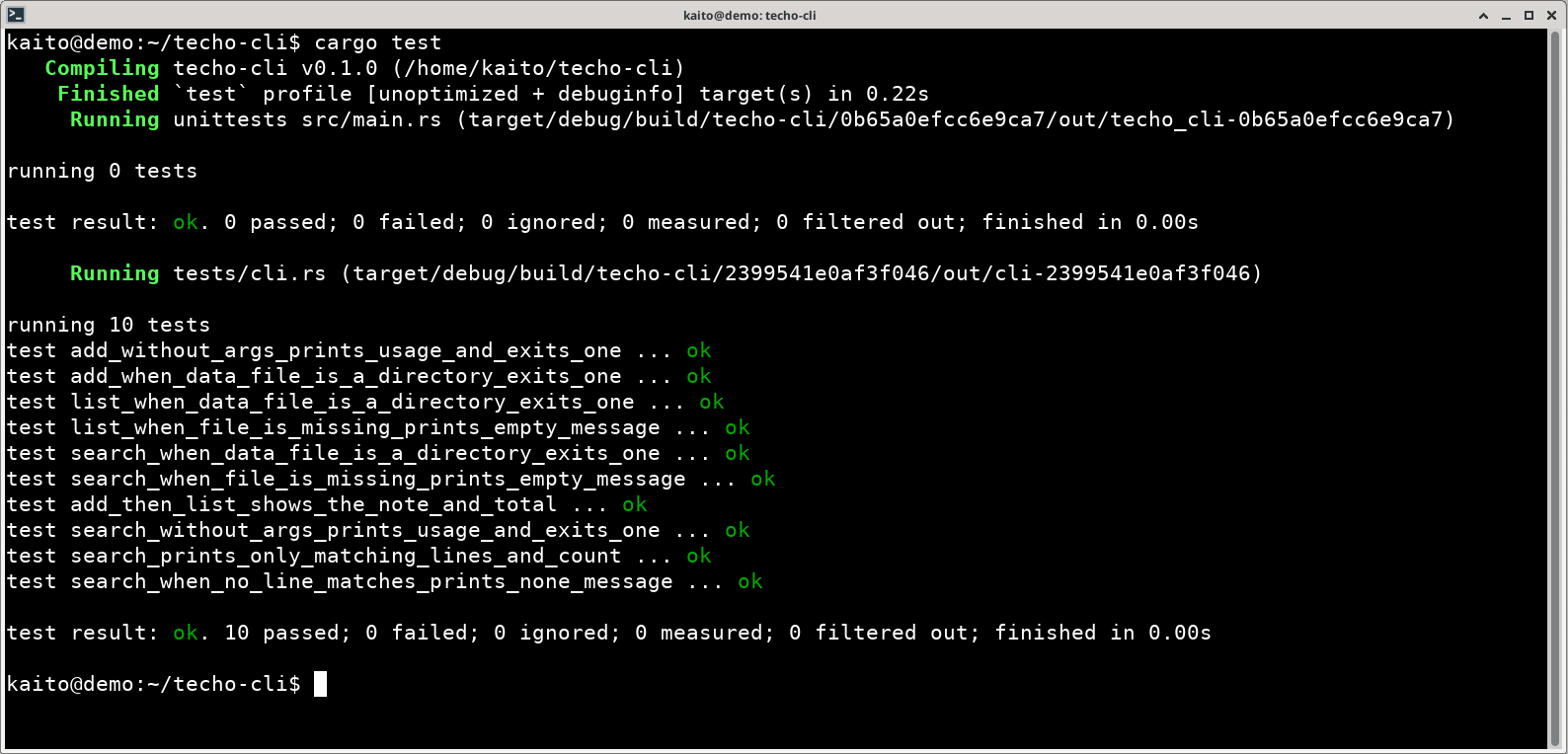
キャプション:search を足した完成形の cargo test。10 passed。画面はログとは別の回で、所要時間とテストの表示順が違う。画面の /home/kaito と、プロンプトの kaito@demo は、検証用の仮のユーザーです
失敗系のエラー文は、cargo test の画面には出ません。確認用の cargo run のログから示します。確認日の実機では、次のとおりでした。
- 1
- 2
- 3
- 4
- 5
- 6
- 7
- 8
kaito@demo:~/techo-cli/scratch-noargs$ cargo run --quiet -- search
--- stdout ---
--- stderr ---
使い方:
  techo-cli add <メモ>
  techo-cli list
  techo-cli search <言葉>
exit=1- 1
- 2
- 3
- 4
- 5
kaito@demo:~/techo-cli/scratch-missing$ cargo run --quiet -- search りんご
--- stdout ---
まだメモがありません
--- stderr ---
exit=0- 1
- 2
- 3
- 4
- 5
kaito@demo:~/techo-cli/scratch-nomatch$ cargo run --quiet -- search みかん
--- stdout ---
該当するメモはありません
--- stderr ---
exit=0- 1
- 2
- 3
- 4
- 5
- 6
kaito@demo:~/techo-cli/scratch-match$ cargo run --quiet -- search りんご
--- stdout ---
1: りんごを買う
該当 1 件
--- stderr ---
exit=0- 1
- 2
- 3
- 4
- 5
kaito@demo:~/techo-cli/scratch-dir$ cargo run --quiet -- search りんご
--- stdout ---
--- stderr ---
エラー: Is a directory (os error 21)
exit=1
os error 21 は、この回の Linux での値です。権限が無いときの確認は、使い捨てディレクトリで、一般ユーザーとして行いました。techo.txt を chmod 000 したあと、search すると エラー: Permission denied (os error 13)、終了コード 1 でした。確認のあと、chmod 644 で戻しています。os error 13 も、この回の Linux での値です。
- 1
- 2
- 3
- 4
- 5
kaito@demo:~/techo-cli/scratch-unreadable$ cargo run --quiet -- search ダミー
--- stdout ---
--- stderr ---
エラー: Permission denied (os error 13)
exit=1大文字と小文字は、区別します。確認日の実機では、Apple pie と apple juice を足したあと、search apple は apple juice だけ、search Apple は Apple pie だけでした。複数語は、add と同じく空白 1 個でつないで、1 つの言葉として探します。search apple pie は、Apple pie と大文字が違うため 0 件で、該当するメモはありません でした。空白だけの言葉(search " ")は使い方を出して、終了コード 1 でした。
- 1
- 2
- 3
- 4
- 5
- 6
kaito@demo:~/techo-cli/scratch-extra$ cargo run --quiet -- search apple
--- stdout ---
1: apple juice
該当 1 件
--- stderr ---
exit=0- 1
- 2
- 3
- 4
- 5
- 6
kaito@demo:~/techo-cli/scratch-extra$ cargo run --quiet -- search Apple
--- stdout ---
1: Apple pie
該当 1 件
--- stderr ---
exit=0- 1
- 2
- 3
- 4
- 5
kaito@demo:~/techo-cli/scratch-extra$ cargo run --quiet -- search apple pie
--- stdout ---
該当するメモはありません
--- stderr ---
exit=0- 1
- 2
- 3
- 4
- 5
- 6
- 7
- 8
kaito@demo:~/techo-cli/scratch-extra$ cargo run --quiet -- search "   "
--- stdout ---
--- stderr ---
使い方:
  techo-cli add <メモ>
  techo-cli list
  techo-cli search <言葉>
exit=1
番号は、一致した行の一覧の番号です。確認日の実機では、3 行目の 3行目のりんご を search 3行目 で探すと 1: 3行目のりんご、該当 1 件 でした。同じファイルの list では 3: 3行目のりんご です。
- 1
- 2
- 3
- 4
- 5
- 6
kaito@demo:~/techo-cli/scratch-extra$ cargo run --quiet -- search 3行目
--- stdout ---
1: 3行目のりんご
該当 1 件
--- stderr ---
exit=0- 1
- 2
- 3
- 4
- 5
- 6
- 7
- 8
kaito@demo:~/techo-cli/scratch-extra$ cargo run --quiet -- list
--- stdout ---
1: Apple pie
2: apple juice
3: 3行目のりんご
合計 3 件
--- stderr ---
exit=0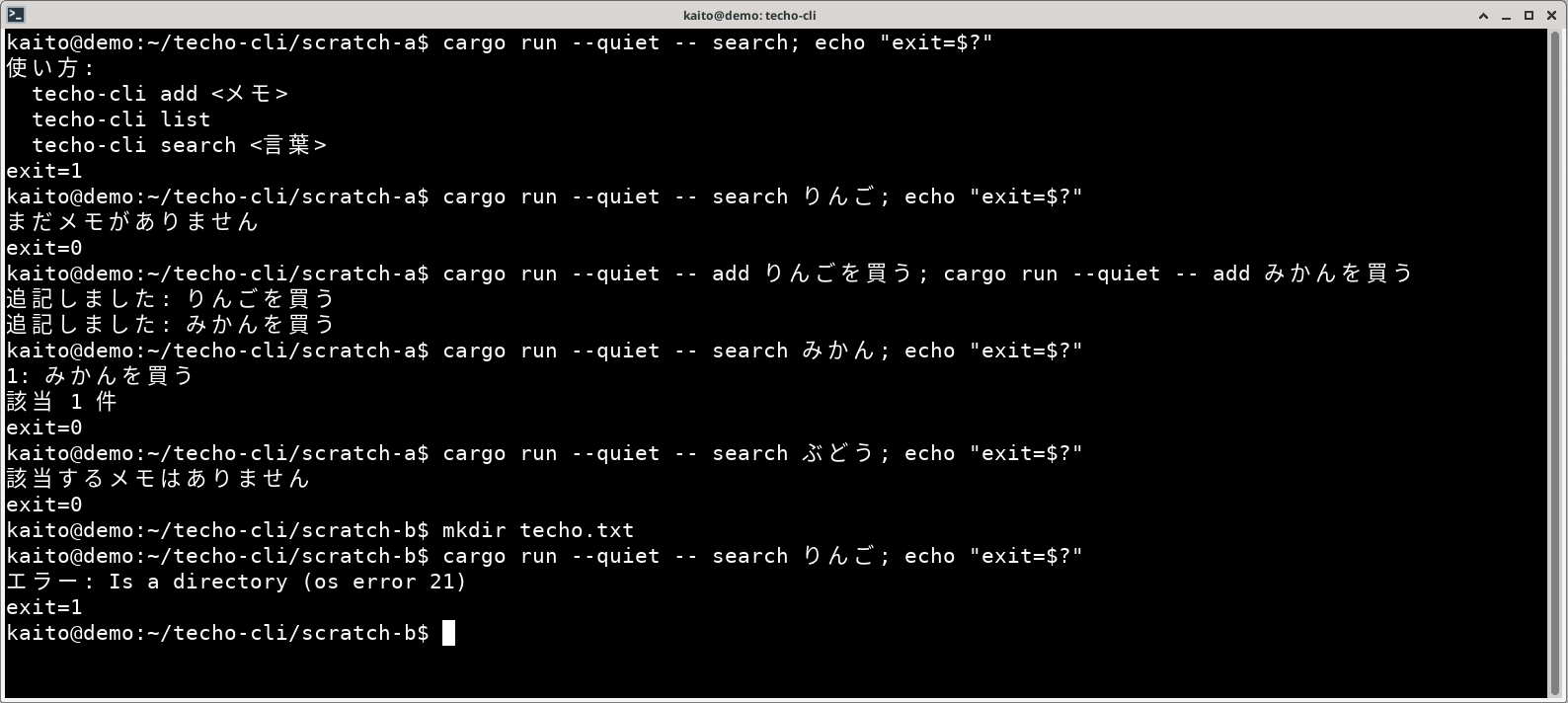
キャプション:search の動きを、cargo run で確認した画面。引数が無いときは使い方(終了コード 1)、ファイルが無いときは「まだメモがありません」(終了コード 0)、一致する行と一致しない行、techo.txt がディレクトリのときはエラー文(終了コード 1)。画面はログとは別の回で、ディレクトリ名は scratch-a / scratch-b(ログは scratch-noargs など)。コマンドのあとに echo "exit=$?" を付けて撮っている。画面のプロンプトの kaito@demo は、検証用の仮のユーザーです
直ったあとに、第4回の確認の型を回す
失敗のテストを足した完成形で、次の4つを、同じディレクトリで、この順に回します。画面も撮ります。
-
cargo check -
cargo test -
cargo clippy --all-targets -
cargo fmt --check
確認日の実機では、完成形の to-verify(空行は1行のまま)を、同じディレクトリ ~/techo-cli で、この順に回しました。結果は次のとおりです。
-
cargo check:終了コード 0 -
cargo test:10 passed、終了コード 0 -
cargo clippy --all-targets:警告なし、終了コード 0 -
cargo fmt --check:終了コード 1
止まった箇所は、上に書いた 118〜119行目です。第6回の「空行が2行」とは、別の理由です。
fn_call_width
fn_call_widthは、rustfmt が、関数呼び出しの引数の部分を1行に収める幅の上限です(公式の説明は Maximum width of the args of a function call before falling back to vertical formatting)。確認日の追加の実機で rustfmt --print-config default を見ると、fn_call_width = 60、max_width = 100、chain_width = 60 でした。
同じ形の1行で、引数の文字列だけを変えて cargo fmt --check を回すと、日本語5文字(あいうえお)は終了コード 0、6文字(あいうえおか)は終了コード 1 で、118〜119行目と同じ折り返しになりました。ASCII は10文字も11文字も終了コード 0 でした。追加で測った範囲では、ASCII は11文字まで通り、12文字から折り返しました。同じ1行に fn_call_width=61 を付けると差分は消え、chain_width を変えても差分は残りました。引数の部分を、日本語1文字を幅2として数えると、5文字で 59、6文字で 61 になり、この結果と一致しました。公式の文書で、その数え方が仕様として書かれているかは、この回では確認していません。この1行の例は、cargo fmt --check が見るための短いファイルで、コンパイルして動かすコードではありません。
- 1
- 2
- 3
- 4
kaito@demo:~/techo-cli$ cargo check; echo "exit=$?"
    Checking techo-cli v0.1.0 (~/techo-cli)
    Finished `dev` profile [unoptimized + debuginfo] target(s) in 0.05s
exit=0- 1
- 2
- 3
- 4
- 5
- 6
- 7
- 8
- 9
- 10
- 11
- 12
- 13
- 14
- 15
- 16
- 17
- 18
- 19
- 20
- 21
- 22
- 23
- 24
- 25
- 26
kaito@demo:~/techo-cli$ cargo test; echo "exit=$?"
   Compiling techo-cli v0.1.0 (~/techo-cli)
    Finished `test` profile [unoptimized + debuginfo] target(s) in 0.09s
     Running unittests src/main.rs (target/debug/build/techo-cli/0b65a0efcc6e9ca7/out/techo_cli-0b65a0efcc6e9ca7)

running 0 tests

test result: ok. 0 passed; 0 failed; 0 ignored; 0 measured; 0 filtered out; finished in 0.00s

     Running tests/cli.rs (target/debug/build/techo-cli/2399541e0af3f046/out/cli-2399541e0af3f046)

running 10 tests
test add_when_data_file_is_a_directory_exits_one ... ok
test list_when_data_file_is_a_directory_exits_one ... ok
test list_when_file_is_missing_prints_empty_message ... ok
test add_without_args_prints_usage_and_exits_one ... ok
test search_when_file_is_missing_prints_empty_message ... ok
test search_when_data_file_is_a_directory_exits_one ... ok
test add_then_list_shows_the_note_and_total ... ok
test search_without_args_prints_usage_and_exits_one ... ok
test search_prints_only_matching_lines_and_count ... ok
test search_when_no_line_matches_prints_none_message ... ok

test result: ok. 10 passed; 0 failed; 0 ignored; 0 measured; 0 filtered out; finished in 0.00s

exit=0- 1
- 2
- 3
- 4
kaito@demo:~/techo-cli$ cargo clippy --all-targets; echo "exit=$?"
    Checking techo-cli v0.1.0 (~/techo-cli)
    Finished `dev` profile [unoptimized + debuginfo] target(s) in 0.08s
exit=0- 1
- 2
- 3
- 4
- 5
- 6
- 7
- 8
- 9
- 10
- 11
- 12
- 13
- 14
- 15
- 16
- 17
- 18
- 19
kaito@demo:~/techo-cli$ cargo fmt --check; echo "exit=$?"
Diff in ~/techo-cli/tests/cli.rs:115:
 #[test]
 fn search_prints_only_matching_lines_and_count() {
     let dir = scratch_dir("search-match");
-    assert_eq!(run_in(&dir, &["add", "りんごを買う"]).status.code(), Some(0));
-    assert_eq!(run_in(&dir, &["add", "みかんを買う"]).status.code(), Some(0));
+    assert_eq!(
+        run_in(&dir, &["add", "りんごを買う"]).status.code(),
+        Some(0)
+    );
+    assert_eq!(
+        run_in(&dir, &["add", "みかんを買う"]).status.code(),
+        Some(0)
+    );
     let output = run_in(&dir, &["search", "りんご"]);
     assert_eq!(output.status.code(), Some(0));
     let out = stdout_text(&output);
exit=1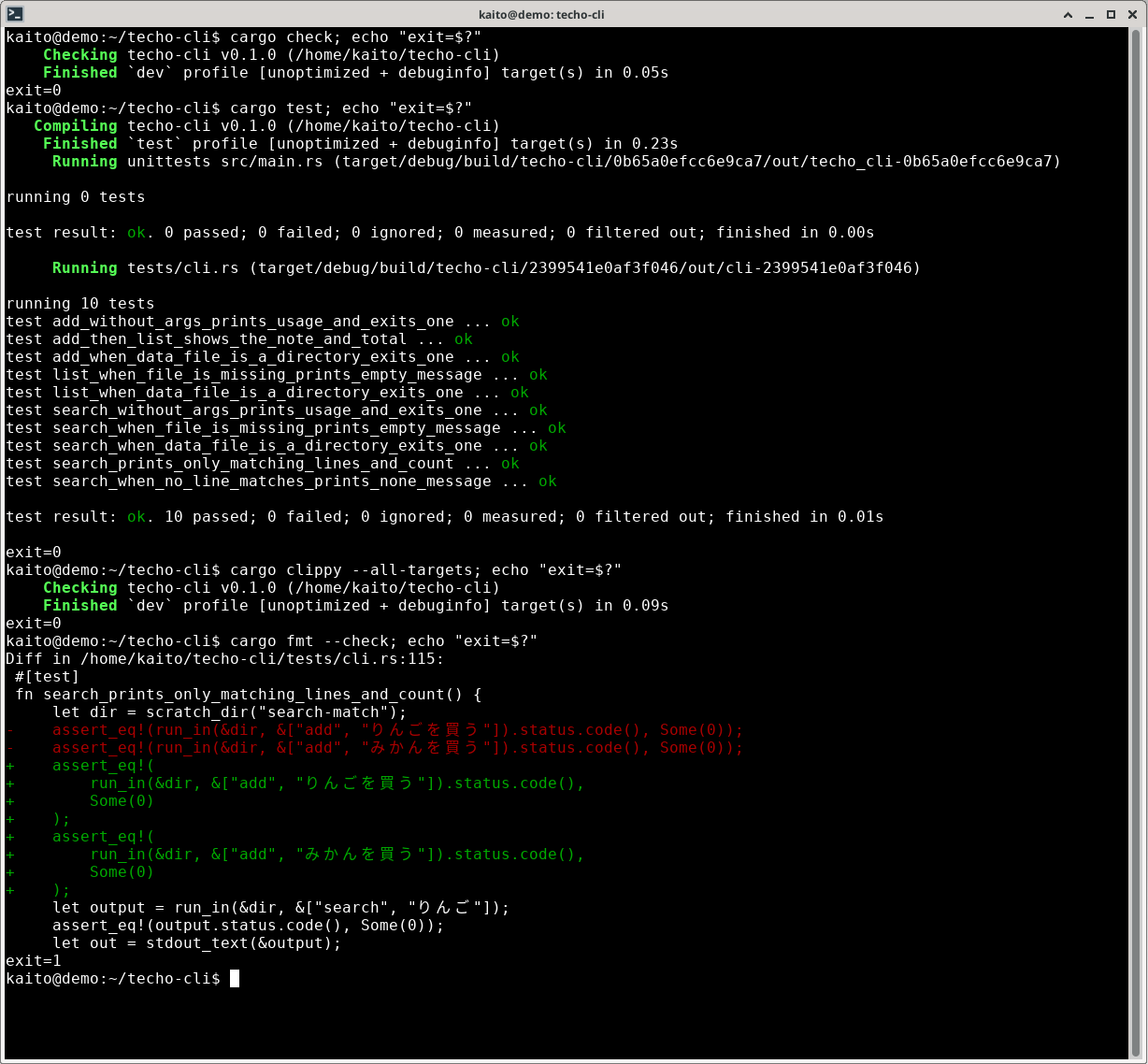
キャプション:同じディレクトリで、cargo check、cargo test(10 passed)、cargo clippy --all-targets は終了コード 0、cargo fmt --check は終了コード 1。差分は search_prints_only_matching_lines_and_count の 118〜119行目。画面はログとは別の回で、所要時間とテストの表示順が違う。画面のコマンドには、終了コードを見るために echo "exit=$?" を付けている。画面の /home/kaito と、プロンプトの kaito@demo は、検証用の仮のユーザーです。完成形では、この2行を cargo fmt の結果に直しています
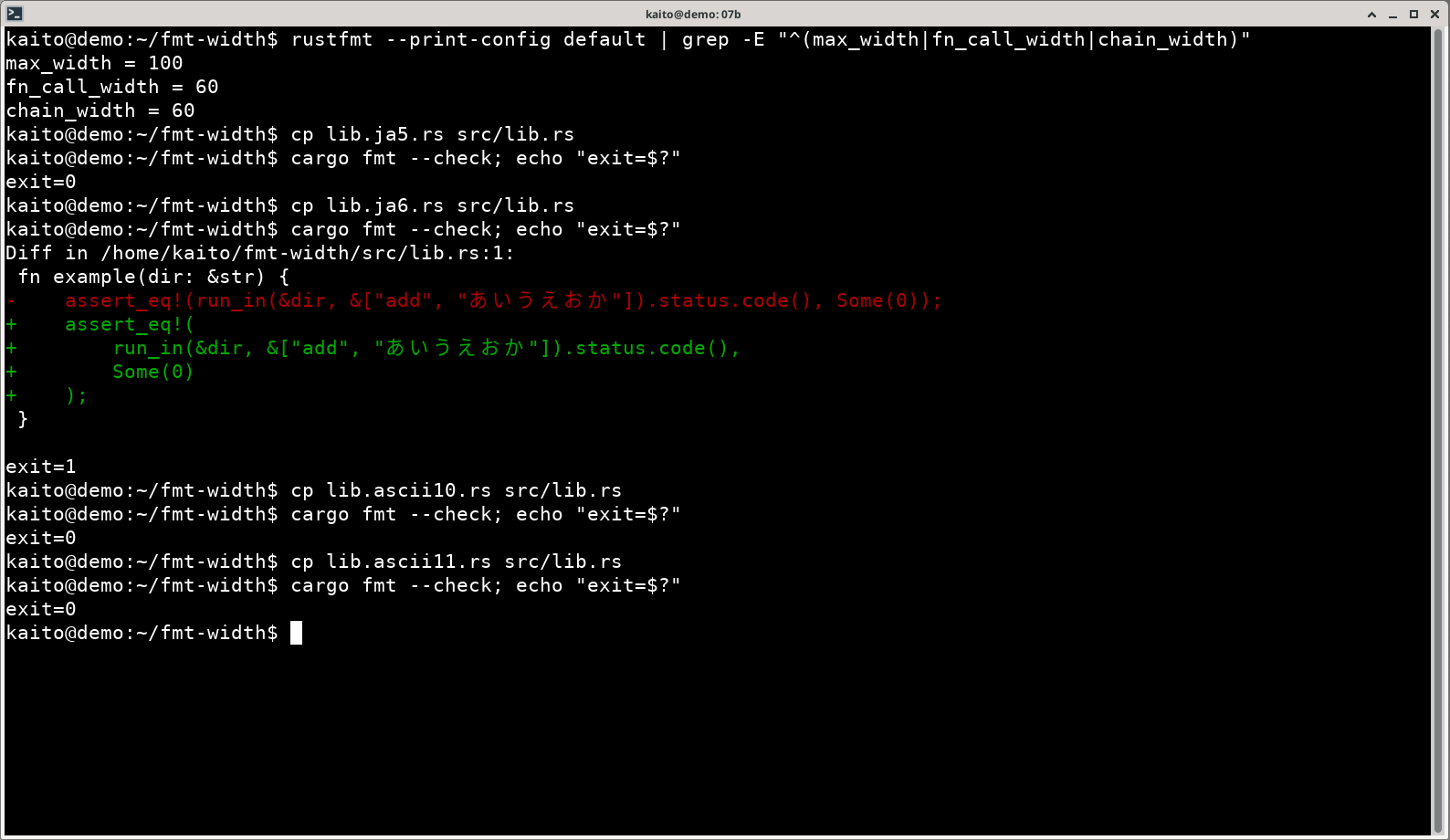
キャプション:同じ形の1行で、日本語5文字(あいうえお)は cargo fmt --check が終了コード 0、6文字(あいうえおか)は終了コード 1。ASCII の10文字と11文字は、どちらも終了コード 0。画面の /home/kaito と、プロンプトの kaito@demo は、検証用の仮のユーザーです
この2行を cargo fmt で直した版は、別ディレクトリのコピー(~/techo-cli-fmtfix)で確認しました。src/main.rs の sha256 は、完成形と同じ 4cb091c257dfcc479030707d2d6e267259cc66bbcfa3f83e53e5e37e21f39813、直した tests/cli.rs の sha256 は 8b3e17d4b4155ccac1dac52a092e587c306d0e79339fd676f086e629ccf7fbef です。同じディレクトリで、cargo check、cargo test(10 passed)、cargo clippy --all-targets、cargo fmt --check が、すべて終了コード 0 でした。
- 1
- 2
- 3
- 4
kaito@demo:~/techo-cli-fmtfix$ sha256sum src/main.rs tests/cli.rs
4cb091c257dfcc479030707d2d6e267259cc66bbcfa3f83e53e5e37e21f39813  src/main.rs
8b3e17d4b4155ccac1dac52a092e587c306d0e79339fd676f086e629ccf7fbef  tests/cli.rs
exit=0- 1
- 2
- 3
- 4
kaito@demo:~/techo-cli-fmtfix$ cargo check; echo "exit=$?"
    Checking techo-cli v0.1.0 (~/techo-cli-fmtfix)
    Finished `dev` profile [unoptimized + debuginfo] target(s) in 0.09s
exit=0- 1
- 2
- 3
- 4
- 5
- 6
- 7
- 8
- 9
- 10
- 11
- 12
- 13
- 14
- 15
- 16
- 17
- 18
- 19
- 20
- 21
- 22
- 23
- 24
- 25
- 26
kaito@demo:~/techo-cli-fmtfix$ cargo test; echo "exit=$?"
   Compiling techo-cli v0.1.0 (~/techo-cli-fmtfix)
    Finished `test` profile [unoptimized + debuginfo] target(s) in 0.20s
     Running unittests src/main.rs (target/debug/build/techo-cli/0b65a0efcc6e9ca7/out/techo_cli-0b65a0efcc6e9ca7)

running 0 tests

test result: ok. 0 passed; 0 failed; 0 ignored; 0 measured; 0 filtered out; finished in 0.00s

     Running tests/cli.rs (target/debug/build/techo-cli/2399541e0af3f046/out/cli-2399541e0af3f046)

running 10 tests
test add_when_data_file_is_a_directory_exits_one ... ok
test add_without_args_prints_usage_and_exits_one ... ok
test list_when_data_file_is_a_directory_exits_one ... ok
test search_when_file_is_missing_prints_empty_message ... ok
test search_when_data_file_is_a_directory_exits_one ... ok
test add_then_list_shows_the_note_and_total ... ok
test list_when_file_is_missing_prints_empty_message ... ok
test search_without_args_prints_usage_and_exits_one ... ok
test search_when_no_line_matches_prints_none_message ... ok
test search_prints_only_matching_lines_and_count ... ok

test result: ok. 10 passed; 0 failed; 0 ignored; 0 measured; 0 filtered out; finished in 0.00s

exit=0- 1
- 2
- 3
- 4
kaito@demo:~/techo-cli-fmtfix$ cargo clippy --all-targets; echo "exit=$?"
    Checking techo-cli v0.1.0 (~/techo-cli-fmtfix)
    Finished `dev` profile [unoptimized + debuginfo] target(s) in 0.09s
exit=0- 1
- 2
kaito@demo:~/techo-cli-fmtfix$ cargo fmt --check; echo "exit=$?"
exit=0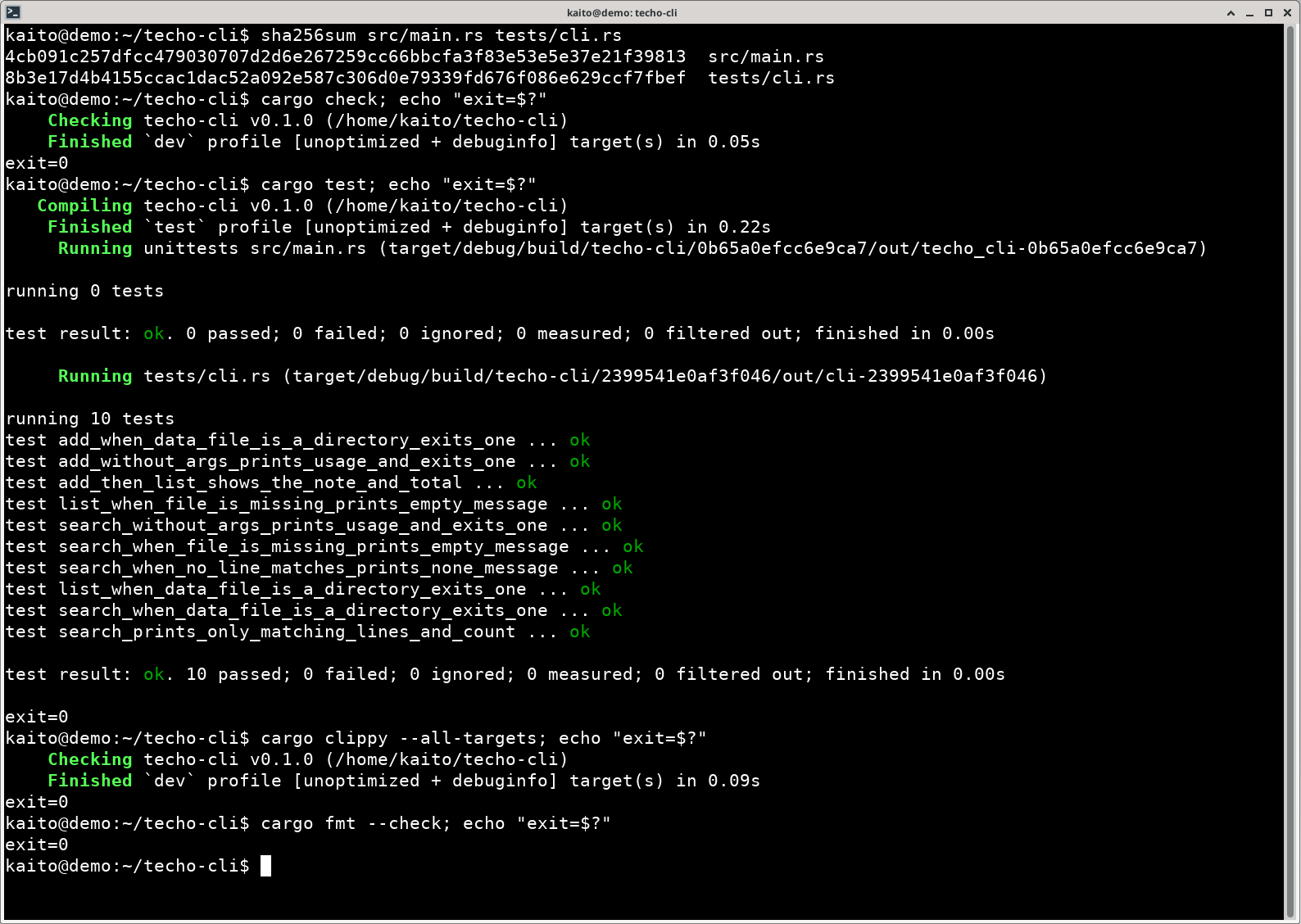
キャプション:118〜119行目を直した版で、cargo check、cargo test(10 passed)、cargo clippy --all-targets、cargo fmt --check が、すべて終了コード 0。ログは ~/techo-cli-fmtfix、画面はログとは別の回で、プロンプトは ~/techo-cli。所要時間とテストの表示順も違う。画面の先頭の sha256 は、ログと同じ値。画面のコマンドには、終了コードを見るために echo "exit=$?" を付けている。画面の /home/kaito と、プロンプトの kaito@demo は、検証用の仮のユーザーです
この回では、クレートは足しません。足す話が出たら、第5回の確認(crates.io と docs.rs、標準ライブラリで足りるか、cargo fetch のあとで build.rs と proc-macro を見る)を先に使います。依存のソースを探すときの注意は、下の「セキュリティの注意」にまとめました。
コードを受け取ったら、見るところ(第7回)
第2回の3点(触ったファイル、[dependencies]、仕様にない機能)と、第4回の確認の型、第5回の依存の確認、第6回の失敗の扱いに、この回では次を足して見ます。
- 誰がデータを所有し、参照はどこまで生きる必要があるかが、説明できるか
- 関数の中だけで生きる値を、借りて外へ返していないか
- 注釈を付けたなら、寿命を変えるためではなく、関係を書くためか。無くて済む注釈が残っていないか
-
searchの失敗テスト(引数が無い、ファイルが無い、該当が無い、中身が読めない)があるか - エラーメッセージに、ホームディレクトリの実パスや、個人情報が出ていないか
-
cargo check、cargo test、cargo clippy --all-targets、cargo fmt --checkを、同じディレクトリで、この順に回したか -
unsafeが増えていないか - 依存を足す話が出たら、第5回の確認を先に行う。足さないなら、
[dependencies]が空のままか
セキュリティの注意
- エラーメッセージや、コンパイラの出力に、自分のホームディレクトリの実パス、アカウント名、個人情報を出さないようにします。出すなら、検証用の仮のユーザーと、伏せたパスにします。
cargo testやcargo fmt --check、rustcの出力にも、プロジェクトの置き場所から始まるパスが出ることがあります。ホームの下に置いていれば、/home/あなたの名前/…のようになります。貼る前に、~などに伏せます - 使うデータは、ダミーの一文にします。自分の日記や、仕事のメモの実データは使いません。メモの中に、APIキーやパスワードを置かないようにします
- 失敗したファイルの中身を、エラーメッセージへそのままコピーしないようにします。秘密が紛れていることがあるからです
- この回は、クレートを足しません。足す場合は、第5回の確認を使います。依存のソースを探すときの注意は、次のとおりです
- 起点を
~/.cargo/registry/srcにするなら、クレート直下は深さ 3 です。深さを指定したfind(-mindepth 3 -maxdepth 3 -name build.rs)と、深さを指定しないfind(同じ起点で-name build.rs)の両方を取ります。-maxdepth 2では足りません -
~/.cargo/registry/srcには他のプロジェクトのクレートも混ざることがあるので、いまのプロジェクトだけを見るならcargo metadataが向いています -
jqが無い環境では、深さを指定したfindで見るか、jqを入れてからcargo metadataを見てください
- 起点を
- 公式:Validating References with Lifetimes / References and Borrowing(Dangling References)
完成形:土台に、search を足す
この回の完成形は、第6回の完成形に、search を足し、tests/cli.rs の 118〜119行目を cargo fmt の結果に直した版です。検索結果は、所有して返す形(Vec<String>)です。比較に使った、借りて返す例(return-local.rs、missing-lifetime.rs、annotated.rs)や、省略の規則を確かめた追加の小さなファイルは、完成形の src/main.rs には入れません。Cargo.toml の [dependencies] は空のままです。
- 土台の
src/main.rs:aff338dca8d9bb9eada24ac80fa9e2ffd938859cbaee630f4b9017eaded19d3d - 土台の
tests/cli.rs:2a4010a6c244c24647e6d9f847e6088ff0e42e5656592e0a65eefa8040f4054d - 完成形の
src/main.rs:4cb091c257dfcc479030707d2d6e267259cc66bbcfa3f83e53e5e37e21f39813 - 完成形の
tests/cli.rs(cargo fmtで直した版):8b3e17d4b4155ccac1dac52a092e587c306d0e79339fd676f086e629ccf7fbef
fmt で直す前の to-verify(tests-cli.rs.after-search.to-verify)の sha256 は a821093e3193bf2b91a6bf3b28cbb78f30bbffec587fd4ff155f34ff980cde01 です。差分は 118〜119行目だけで、完成形には使いません。
AIに頼むときのプロンプト
第2回の4点(目的・対象・制約・確かめ方)に、この回の制約を足して頼む例です。AIの返事そのものは載せません。コマンドは、自分がターミナルで実行します。
1. 検索を足してもらう(所有して返す形を優先)
- 1
- 2
- 3
- 4
目的: techo-cli に search を足す。検索結果は、所有して返す形(Vec<String>)にする
対象: src/main.rs と tests/cli.rs。関係ないファイルは変えない
制約: コードを書く前に、誰がデータを所有し、参照はどこまで生きる必要があるかを日本語で説明して。注釈なしで済むなら、その形を優先して。依存は足さない。ユーザー入力やファイルI/Oで unwrap しない。エラーメッセージにホームディレクトリの実パスや個人情報を出さない
確かめ方: 引数が無い、ファイルが無い、該当が無い、中身が読めない、のテストも書いて。cargo test と cargo clippy --all-targets と cargo fmt --check は、私が回す
2. コードのライフタイム注釈を一覧してもらう
- 1
- 2
- 3
- 4
目的: コードのライフタイム注釈を、付ける前に一覧する
対象: src/main.rs と tests/cli.rs
制約: コードを書き換える前に報告して。各注釈について、どの参照の関係を書いているか、無くてもよいかを分けて書いて。寿命を変えるための注釈だ、という説明はしないで
確かめ方: 一覧を見たあと、確認の型は、私が回す
3. 所有して返す形と、借りて返す形の比べ方を書いてもらう
- 1
- 2
- 3
- 4
目的: 検索結果を所有して返す形と、借りて返す形を比べる手順を書く
対象: 手順だけ。完成形のコードを先に書き換えない
制約: 検証用の空ディレクトリで行う。ホームの実パスを手順に書かない。出力の予想は書かず、コマンドと見たい点だけ書く。関数の中の値を借りて返す例と、注釈が必要な例を分ける
確かめ方: 手順を見たあと、コンパイルとテストは、私が回す
よくあるつまずき
-
'aを見ただけで、読むのをやめる。まずは、誰が持って、参照はどこまで必要かを日本語で言う - 「ライフタイムを直して」だけ頼んで、必要のない注釈が並ぶことがある。範囲と、注釈なしで済む形を先に書く
- 関数の中で読んだ文字列を、借りたまま返そうとしてコンパイルが止まる。所有して返すか、元のバッファを引数で残す
- コンパイラの help が、両方の引数に同じ印を付ける案を出しても、返す参照が指している側だけを見る
- 失敗のテストを足したあと、
cargo fmt --checkが止まる。この回は空行ではなく、118〜119行目のassert_eq!を rustfmt が分けたがった。追加の確認では、引数の幅がfn_call_width(既定 60)を超える日本語6文字の行は折り返し、5文字の行は通った。直してから、確認の型の4つ目まで、同じディレクトリで回す - 検索のために、先にクレートを足す。この回は標準ライブラリの
containsで足ります。足す話が出たら、第5回の確認が先です
まとめ
- ライフタイムは、参照がいつまで有効かの話。多くの場合は推論される。公式の省略の規則は、完全な推論ではない
- 注釈は、寿命を変えない。関係を書く印で、必要になるときだけ書く
- 関数の中だけで生きる値を、借りて外へ返すことはできない
- 検索結果は、所有して返す形と、借りて返す形がある。小さなCLIでは、所有して返す形で足りることがある。この回の
searchは、大文字と小文字を区別する - 失敗のテストを足し、
cargo fmt --checkが通る形に整えてから、第4回の確認の型を、同じディレクトリで回す
次の一歩
次に読むのは、第8回「RustのasyncをAIに書かせる|動かしたあとで、unsafeと秘密情報までレビューする」です。小さな非同期の例と、連載で少しずつ作ってきた techo-cli の見直し(テスト、clippy、依存、unsafe、パスワードやAPIキー)を見ていきます。
確認の型は第4回に、クレートを足す前の確認は第5回に書いてあります。所有権と借用の話は、第3回です。失敗を Result で返す話は、第6回です。読む順番は、最初の記事にあります。
関連する本・記事
公式:
- 公式:Validating References with Lifetimes
- 公式:References and Borrowing(Dangling References)
- 公式:Generic Types, Traits, and Lifetimes(The Book 第10章)
- 公式:Lifetime elision(The Rust Reference)
- 公式:Error code E0515
- 公式:Error code E0106
- 公式:Cursor Plan Mode
公開済みの関連記事:
前の回は、第6回「unwrap を減らす|失敗を Result で扱うRust CLI」です。第5回、第4回、第3回と、読む順番は、難解なRustを、AIと一緒に動かす|バイブコーディングの読む順番 にあります。